
Most bad domain buys fail for one simple reason: there aren’t enough buyers. Before I spend $50, $500, or more, I want a fast count of companies that could buy the name today.
Here’s the short version:
- I focus on end users, not other domain investors
- I define the buyer pool in 15 seconds
- I count live companies already tied to the term
- I check for budget signs like funding, hiring, or growth
- I look for firms on weak domains like .io, .net, hyphenated, or long URLs
- I make a plain call: buy, maybe, or pass
A simple rule helps:
- 0 to 2 buyers = pass
- 3 to 9 buyers = maybe
- 10+ buyers = workable market
- 50+ buyers = strong market
If I can’t find several solid buyers fast, I move on. That one habit can cut years of renewals on names with no market.
This piece is about one thing: how I check buyer demand in under a minute before I buy a domain.
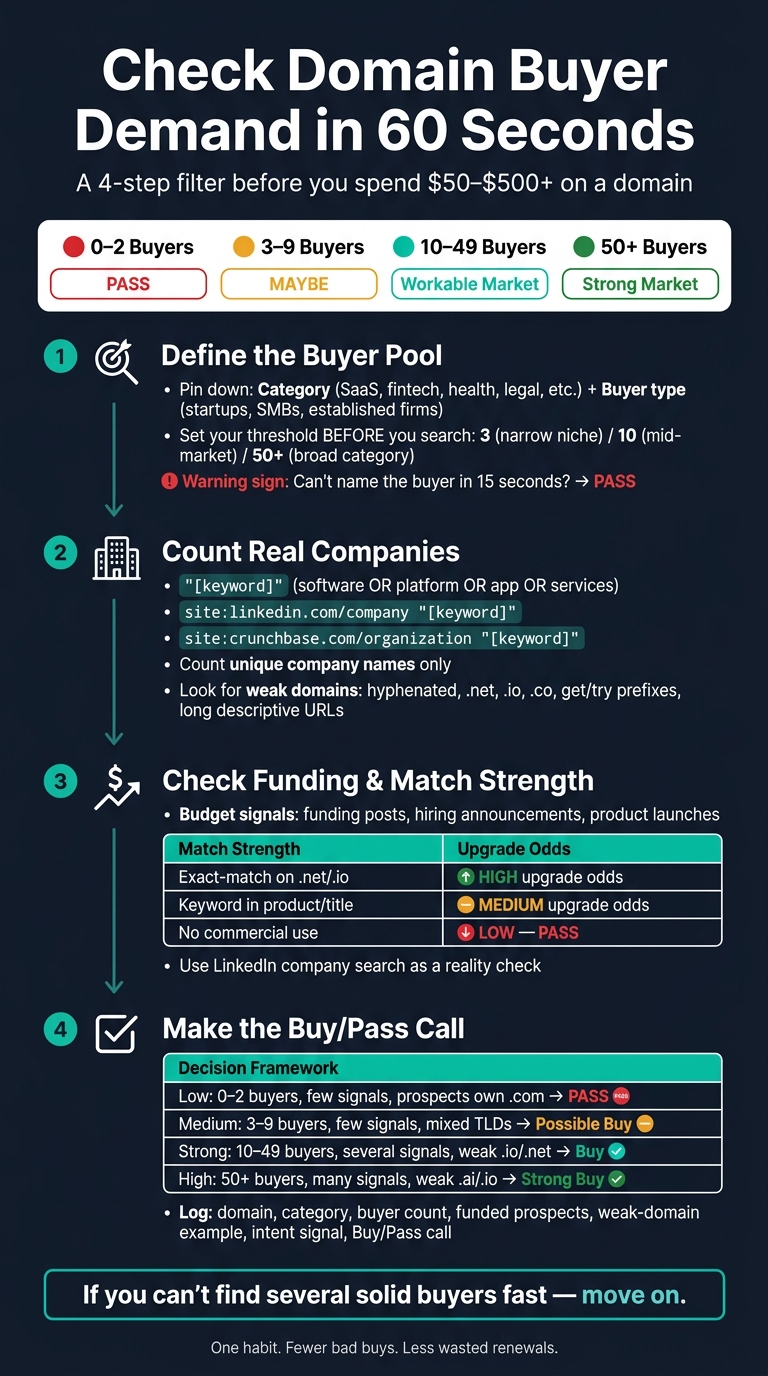
How to Check Domain Buyer Demand in 60 Seconds
Step 1: Define the buyer pool at a glance
Start by defining the buyer pool FAST. Ask yourself: who would buy this domain?
If you can't answer that almost right away, selling it later gets a lot harder. Once the buyer pool is clear, you can start counting actual companies instead of guessing.
Pin down the category, use case, and buyer type
First, match the term to a business category and a buyer type.
Put the domain into a category like SaaS, AI tooling, fintech, health, legal, local services, or cybersecurity. Then pair it with the kind of buyer most likely to want it: funded startups, SMBs, or established firms that may want to replace a weaker domain they already use.
Category shows you where to look. Buyer type shows you who should count.
A clear term like tax help points to a small, obvious buyer pool. A vague brand name does the opposite. It gives you a pool that's too fuzzy to measure.
If the term doesn't line up with a known business category, that's a warning sign. And if you can't name the likely buyer in 15 seconds, pass.
Set your pass/fail target: 3, 10, or 50+ buyers
Once you know the category and buyer type, set your threshold before you search.
| Buyer Count | Market Strength | Risk Level |
|---|---|---|
| 3 buyers | Thin | High / Risky |
| 10 buyers | Workable | Medium |
| 50+ buyers | Strong | Low / Liquid |
Use 3 for narrow niches, 10 for local or mid-market terms, and 50+ for broad categories.
Then check whether those buyers are actual businesses, not just names that sound possible.
Step 2: Count real companies already using the term
Next, count the companies already using the term. The point here is simple: find actual end users built around the term, then see whether they’re sitting on a weak domain that could make them a likely upgrade buyer. You’re testing whether that buyer pool is there in the first place.
Use Google search operators to find active businesses
Start with a buyer-intent search in Google:
"[keyword]" (software OR platform OR app OR services)
This tends to surface active businesses built around the term while cutting out parked pages and informational noise.
Then run these two targeted queries:
site:linkedin.com/company "[keyword]"- finds active company pagessite:crunchbase.com/organization "[keyword]"- surfaces established entities and funded startups
Check the top results and count unique company names only. As a rule of thumb, 10+ unique companies is workable. 3 or fewer is thin.
Look for weak domains that signal upgrade demand
Not every company matters equally. A company matters more when it already has demand but uses a weak domain.
The strongest likely upgrade buyers are often using:
- hyphenated names
- prefixes like
getortry - longer descriptive domains
- alternative extensions like
.net,.org,.co, or.iofor a commercial product
Why does this matter? Because the business already exists. The weak point is the URL. That’s often the kind of signal that can support a premium upgrade.
Filter out junk and keep only plausible buyers
After you count companies, qualify the ones that can actually pay. Add this to your query:
-inurl:news -site:facebook.com -site:youtube.com
That helps strip out press mentions and social profiles.
From there, skip directory listings, hobby sites, and inactive pages. Count only companies with:
- a live site
- visible activity
- a budget signal, such as funding or 10+ employees
Step 3: Check funding, exact-match use, and commercial intent
A raw company count shows you who exists. This step shows you who can pay - and who may have a clear reason to upgrade now.
The goal is simple: filter your list for companies with budget, traction, and a reason to act.
Count funded startups and active businesses with budget
Recent funding, hiring, and product launches are some of the fastest signs of budget and urgency. These are strong buying signals that can make a domain upgrade more likely.
On LinkedIn, check the Activity tab for signs like:
- Funding posts
- Hiring announcements
- Product launches
- Conference appearances
If a company is growing in public, there's a better chance it has money to spend and a reason to sharpen its brand.
Check whether the keyword appears in the company name, product name, or current domain
Use match strength to sort likely buyers from weak prospects.
| Usage Type | What It Looks Like | Upgrade Odds |
|---|---|---|
| Exact-match on a weaker TLD | Company uses Keyword.net or Keyword.io |
High - natural path to brand authority and trust |
| Near-match (product/title) | Keyword appears in a product name or page title | Medium - depends on product traction |
| Category-defining | Domain represents an entire industry vertical | High - attractive to market leaders or well-funded startups |
| No clear commercial use | Term has no direct business application | Low - pass |
If a company already owns the .net or .io version, that's a strong signal. They've already said, in effect, “yes, this term matters to us.” That makes for a much stronger outbound case than a company with only a loose tie to the keyword.
Use LinkedIn company search as a reality check

Search the keyword in LinkedIn's company directory to make sure the results are real, active organizations.
A thin pool of inactive or loosely related companies is a warning sign. It usually means the buyer market is too small to justify the purchase, even if the domain sounds great on paper.
If the pool looks thin or inactive, pass before you spend.
Step 4: Make the buy/pass call and log it
You’ve counted the companies, checked funding signals, and looked at match strength. Now turn all of that into one clear call.
A simple buy/pass table for low, medium, and high demand
Use the scan to make a plain rule-based decision.
| Demand Level | Buyer Count | Funding Signals | Existing Domain Strength | Buy/Pass |
|---|---|---|---|---|
| Low | 0: 2 | Few or no funding signals | Prospects already own the .com | Pass |
| Medium | 3: 9 | Few funding signals | Mixed (.io, .net, hyphenated) | Possible buy |
| Strong | 10: 49 | Several funding signals | Many weak .io, .net, or descriptive names | Strong buyer market |
| High | 50+ | Many funding or hiring signals | Many weak .ai, .io, or descriptive names | Strong buyer market |
If the count is low, pass. Simple as that.
Log the count in a portfolio sheet before you buy
Once you assign a row, write it down before you buy.
Log:
- The domain
- The category
- The buyer count
- Funded prospects
- The strongest weak-domain example
- One intent signal
- Your Buy/Pass call
This matters more than it may seem at first. When you log each call, you can look back later and see where your cutoffs worked and where they didn’t. That makes your next decision easier and less based on gut feel.
Conclusion: Buy names with a real buyer market
The four steps in this guide give you a fast filter that you can use again and again: define the buyer pool, count real companies, check funding and match strength, then make a rule-based call.
The goal isn’t to buy names that might work someday. The goal is to buy names with a real buyer market right now. Count real buyers, log the count, and only buy when the market is there.
FAQs
What counts as a real buyer?
A real buyer is a company or person that has a current, specific need for that domain name.
That means they’re not just buying on a hunch. They already have a use for it.
Good signs include:
- recent funding
- new trademark filings
- products or services that line up with the name
You can also look for businesses in the same niche that are already using weaker domain names. If the domain is an exact match for what they do, that’s a strong fit.
How do I judge a brandable domain fast?
Judge a brandable domain fast by counting likely end-users with clear intent to buy. Start with businesses that fit the name, the product, or both. Then look for signals that show they may be in buying mode, like recent funding or new trademark filings.
It also helps to check for companies using weak-match domains. Those are often your most likely buyers because they already have a naming or branding gap to fix.
This moves you past gut feel and toward domains with real outbound potential and demand you can actually measure.
Should I buy if the buyer count is low but strong?
Yes. A low buyer count can still be fine if the leads are high quality.
A small, credible group of prospects with clear buying signals - like a matching industry, recent funding, or relevant trademark filings - can matter more than sheer volume. Those buyers are more likely to see the domain as a strong fit for their business needs.