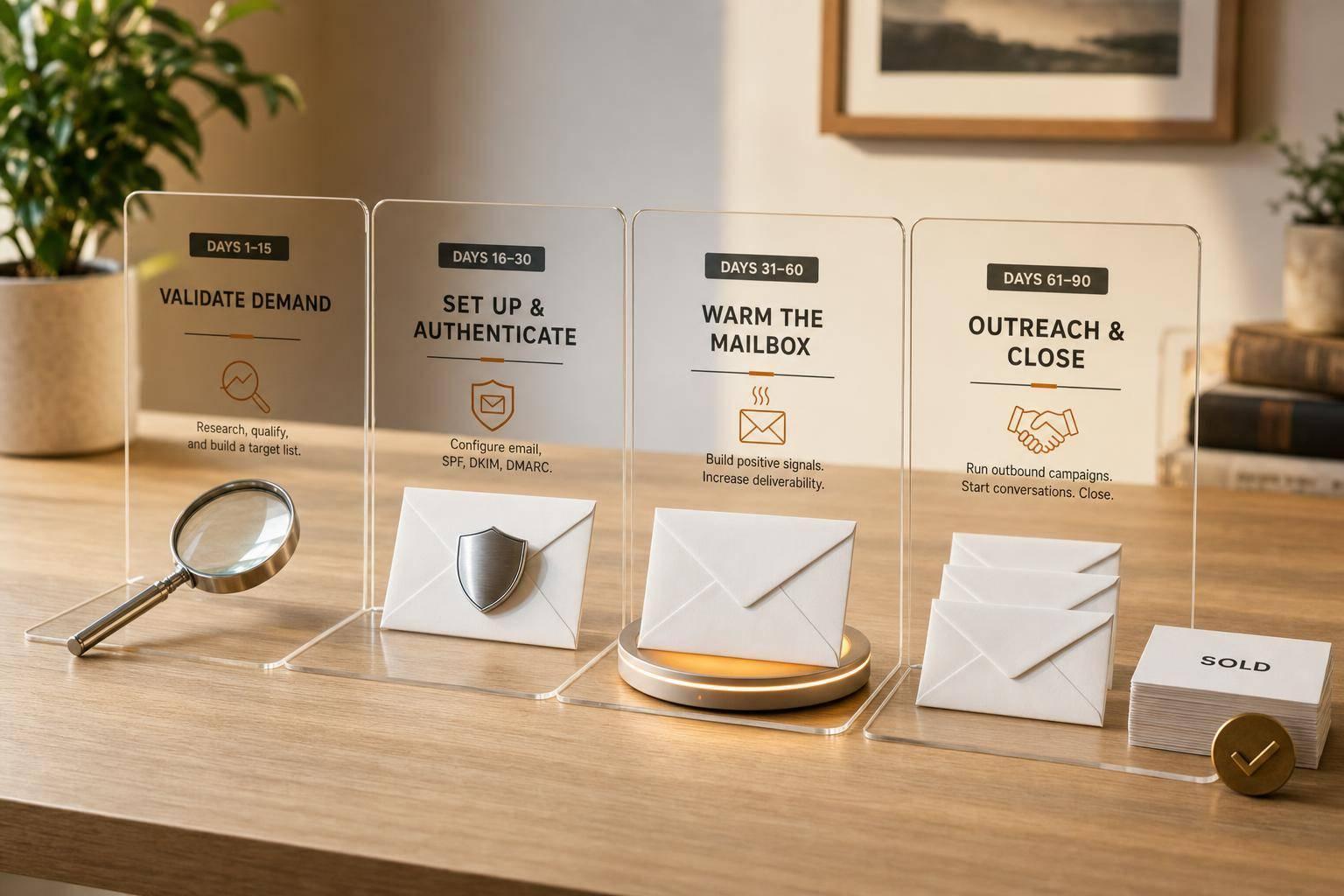
Most hand-registered domains do not sell because they never reach the right buyer. In this 90-day plan, I focus on four things: checking if the name has buyer demand, setting up email so messages land in the inbox, contacting 25 to 50 likely buyers with a 3-touch sequence, and using reply data to decide whether to keep, park, or drop the domain.
Here’s the short version:
- Days 1, 14: I check if the domain has a market at all.
- Days 15, 30: I set up a separate sending domain with SPF, DKIM, and DMARC, then warm the mailbox for 2 to 4 weeks.
- Days 31, 60: I build a list of end users and send 3 emails over about 10 to 18 days.
- Days 61, 90: I track replies, answer interested buyers within 1 business day, and make a clear keep-or-stop call.
A win by Day 90 is not just a sale. It can also mean I now know, from actual buyer replies, whether the domain is worth more outbound work or not.
What I’m looking for by the end:
- 10 to 30 likely buyers before outreach starts
- 25 to 50 verified contacts for the full test
- Around 1%: 2% positive replies as a decent sign
- A clean decision: negotiate, list passively, or drop at renewal
This is not a waiting game. It’s a short test with a clear end point.
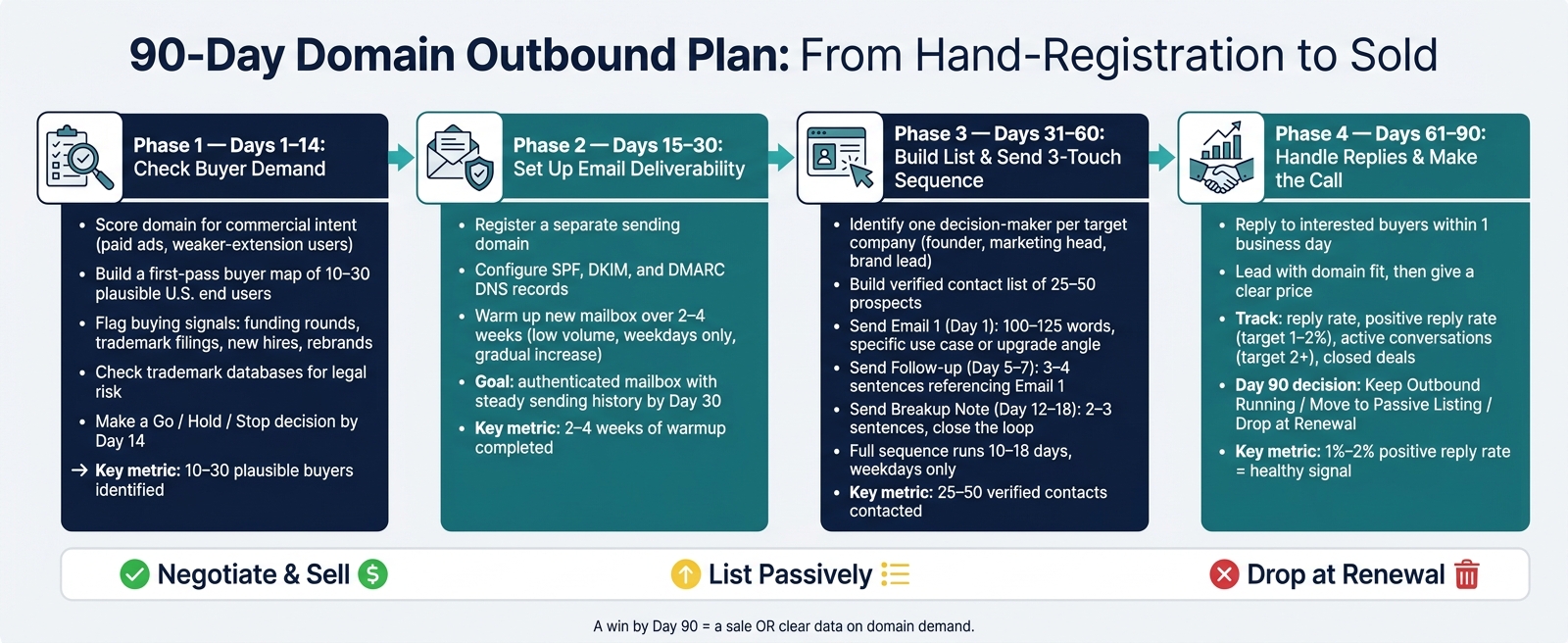
90-Day Domain Outbound Plan: From Hand-Registration to Sold
Outbounding Domain Names (Sales Outreach Tutorial)
Days 1, 14: Check Buyer Demand Before You Spend Time and Reputation
Days 1, 14 are about one thing: proving the domain is worth outbound. If you miss here, you can burn the full 90 days on a name that was never likely to sell.
Score the domain for buyer demand
Start with a basic commercial intent check. Search the exact phrase and look at the results. If paid ads show up for that phrase, that’s usually a sign that companies are already spending money to reach that market. Then check whether active businesses are using the same name on weaker extensions like .net, .org, or .biz. Those companies can be strong outbound targets if they want an upgrade.
Also look for buying signals in the niche. Recent funding rounds, trademark applications, new executive hires, and rebrands all point to companies that may have both a reason to buy and the budget to do it. If your hand-reg sits in a space with no paid ads, no clear signals, and no companies on weaker extensions, that tells you plenty. Move on early.
Build a first-pass buyer map
If the domain clears that first check, build a list of 10 to 30 plausible U.S. end users before you send a single email. Use search results and industry directories to find companies that could use the name in a commercial way. Put growing or changing businesses near the top. Funding rounds, trademark activity, new hires, and rebranding efforts are all worth marking.
Trademark databases matter here. Search the exact name and close variations. If another company already has a live trademark risk tied to the name, don’t send outreach. The legal risk isn’t worth it.
Speeder.ai Scout can automate a big part of this process by scanning funding filings and trademark databases to surface companies most likely to want a specific domain. That can cut manual research time and push the best-fit buyers to the top of your list.
Decide: go, hold, or stop
By Day 14, make a clean decision. Go if you’ve found 10 to 30 plausible buyers, checked for low trademark risk, found a clear use case, and set a price that makes the outreach worth doing. Hold if the name is good but the niche is quiet for now. In that case, park it and revisit later. Stop if the buyer list is thin, the trademark risk is real, or the sale price ceiling is too low to justify the work.
| Decision | Criteria |
|---|---|
| Go | 10: 30 plausible buyers, low trademark risk, clear use case, price justifies effort |
| Hold | Strong name, quiet niche, better suited for passive listing |
| Stop | Thin buyer pool, trademark conflict, or price ceiling too low for outbound |
If the domain passes, the next 15 days are for deliverability and mailbox setup.
Days 15, 30: Set Up a Sending Domain That Reaches the Inbox
Your domain passed the Day 14 check. Now comes the part that decides whether anyone will even see your emails: getting into the inbox.
Before you write a single outreach message, you need a sending setup that can land mail where it belongs. Skip this step, and your pitch may end up in spam. Worse, it can damage your sending reputation.
Configure SPF, DKIM, and DMARC correctly
Use a separate sending domain for outreach. That keeps any reputation risk away from your main domain.
Once that domain is ready, add these three DNS records first:
- SPF (Sender Policy Framework) tells receiving mail servers which IP addresses are allowed to send email for your domain.
- DKIM (DomainKeys Identified Mail) adds a cryptographic signature to each outgoing message, showing that the email wasn’t altered in transit.
- DMARC connects SPF and DKIM and tells receiving servers what to do if a check fails - quarantine the email, reject it, or allow it through.
These records need to be set up correctly before you send anything. If even one is missing or set up wrong, your messages can get pushed to spam.
Warm up a new mailbox over 2 to 4 weeks
A new mailbox starts with no reputation. You have to build that trust slowly.
Start with very low volume in week 1. Then increase sending bit by bit over 2 to 4 weeks, stick to weekdays, and avoid sudden jumps. Think of it like breaking in a new engine - you don’t floor it on day one.
By Day 30, you want a mailbox with authenticated records, a steady low-volume sending history, and a consistent weekday pattern. That puts you in a good spot for real prospect outreach on Day 31.
Use a stack you can manage solo
Once the mailbox is warmed up, the next job is keeping the setup simple enough to run on your own. Solo outbound can get messy fast when DNS, warmup, and reply routing are split across different tools.
Manual outbound for a domain portfolio can take 20 to 30 minutes per domain per touchpoint.
Speeder.ai’s built-in deliverability workflow handles this part for you. Courier sends from warmed mailboxes, supports SPF and DKIM, uses a weekday-only schedule, and routes every reply straight to your inbox. Outreach credits cost about $0.30 to $0.50 per buyer email, and credits are used only when an email actually sends, after domain ownership is verified.
You can build this stack yourself or use a platform that includes deliverability tools. Either way, the order doesn’t change: authentication first, warmup second, outreach third. Once authentication and warmup are done, Day 31 is when outreach starts.
Days 31, 60: Build Your Prospect List and Send a Tight 3-Touch Sequence
Your mailbox is ready. Now it’s time to use the Days 1: 14 buyer map to find the right decision-makers and put the domain in front of them. At this stage, the job is pretty simple: pick the right people, send a short pitch, and follow up twice.
Find the right company and the right contact
Focus on end users: the company or person who would actually use the name. For each company, narrow it down to one decision-maker, not a generic inbox.
Start with companies using weaker extensions. Then sort them by signals like recent funding, trademark filings, or new hires.
Once you’ve picked a target company, reach out to the person who can say yes. That’s usually the founder, head of marketing, brand lead, or product leader.
Track every prospect in a simple spreadsheet or CRM with these five fields:
- company name
- contact role
- verified email
- specific use case for the domain
- priority score
Once the list is ranked, write one message for each decision-maker.
Write emails that sound human and specific
Generic outreach gets ignored. Specific outreach gets replies.
Keep each email between 100: 125 words, with one clear ask and no fluff. Open with something real and specific: a recent product launch, a funding round, or the fact that they’re still using a .io. That one detail shows you looked into their business instead of blasting the same message to everyone.
Here are four pitch angles that work well for new domains:
- Brand upgrade: They’re using a weaker extension, and you position the stronger upgrade.
- Exact-match fit: The domain matches their product name or business category.
- Product launch alignment: They filed a trademark or posted a job for a new product line that fits the name.
- Category-level exact match: The domain is the generic term for their market.
Skip stiff, fake-sounding personalization. A line like "I noticed you are the Head of Marketing at [Company]" feels automated and easy to ignore. Write like you’re talking to someone at a conference: direct, clear, and specific.
Run a 3-touch outbound cadence
Don’t treat outreach like a one-and-done email. Run a short sequence. Most replies in domain outbound happen on the second or third email, so if you send only one message, you leave a lot of buyers untouched.
| Timing | Goal | Length | |
|---|---|---|---|
| Email 1 | Day 1 | Lead with the specific use case or upgrade angle | 100: 125 words |
| Follow-up | Day 5: 7 | Short, direct reference to the first email | 3: 4 sentences |
| Breakup note | Day 12: 18 | Close the loop; leave the door open | 2: 3 sentences |
Run the full sequence over 10 to 18 days, on weekdays only. The follow-up and breakup note don’t need to sell the domain all over again. Their job is simpler than that: get the decision-maker to reply.
The breakup note should close the loop without pressure: "I'll take the silence as a pass for now. If timing changes, the name is [domain]."
Use a tool that can draft, send, and route replies from warmed mailboxes if that helps. You can also do it by hand. For larger operations, you might need cold email infrastructure designed to stay out of spam. Either way, the structure stays the same: first email, follow-up, breakup note - spread across about two and a half weeks, then stop.
Days 61, 90: Handle Replies, Track Numbers, and Decide Whether to Keep Going
By Day 61, your test is out in the market. At this point, the job changes. You’re no longer focused on sending emails. You’re watching for buyer interest, handling replies, and figuring out if this domain has actual demand or if it just looked good on paper.
Reply fast and move interested buyers to a price and transfer path
Reply within one business day when someone shows interest. In cold outreach, timing matters. Wait too long, and the moment is gone.
When you answer, start with why the domain makes sense for their business. Don’t lead with “it’s available.” Lead with fit. Keep the note short and clear. If they ask for a price, give it. Don’t dance around the number, and don’t hide it inside a long paragraph. Get to the price, get agreement if there’s interest, and then move straight to a secure transfer path or direct checkout.
If you’re using Speeder.ai, Concierge sends replies to your inbox so you can handle the negotiation yourself.
Track the signals that decide keep or stop
Reply data tells you a lot. It shows whether the name has end-user appeal or whether the campaign only created noise. Through Day 90, track the numbers below:
| Metric | Healthy Signal | Warning Sign | Possible Action |
|---|---|---|---|
| Reply Rate | Most replies arrive after touch 2 or 3; zero replies after the full sequence points to a list or deliverability problem | High bounce rate or 0% replies | Review lead quality or subject lines; check SPF/DKIM/DMARC |
| Positive Reply Rate | 1%: 2%, with "How much?" or "Tell me more" responses | 0%, only unsubscribes | Refine the pitch angle or revisit the buyer map |
| Conversations | 2+ active price discussions | No active conversations after the full sequence | Expand the buyer map or check deliverability |
| Closed Deals | Sale that covers renewal and outreach costs | No sale after 90 days | Move to passive listing or drop at renewal |
A positive reply rate below 1% often points to deliverability issues or a weak contact list. If you get 0% positive replies after 25: 50 verified contacts, that’s a much stronger sign that the domain may not have buyer demand.
Make the Day 90 call
By Day 90, you have something better than a hunch. You have data from verified buyers, a tested use case, and an email setup that’s already been put through its paces. Now make the call.
- Keep outbound running if replies are still coming in, or if the issue looks like the list or pitch rather than the domain itself.
- Move to passive listing if the domain has brand appeal but didn’t sell during this round.
- Drop it at renewal if a verified list of 25: 50 contacts gets zero positive replies. At some point, the market has answered. There’s no point paying another renewal fee on hope alone.
FAQs
How do I know if a hand-reg is worth outbound?
Judge it by buyer-intent signals you can actually see. Put the most weight on names that match specific companies, especially ones with recent funding or new trademark filings. Those are often signs that a company may need a new brand identity.
It also helps to check whether the niche already has competition and search demand. If nobody is building in the space and nobody is searching for it, the name may be hard to sell.
The best domains usually do one simple thing: they speak to a clear, urgent problem for a specific audience.
What if my outreach gets no replies?
If your outreach gets no replies, don’t jump to “this domain has no value.” More often, the issue is the approach, not the asset. Take a step back and look at why prospects may not be engaging. If anyone sends a rejection, use that feedback to tighten your pitch. And make sure you’re speaking to a specific problem a buyer will pay to solve.
If nothing changes after two weeks, go back to your target list. Put more attention on higher-intent prospects, like companies with recent funding or new trademark filings. It also helps to move past generic templates and send outreach that feels more personal and tied to the buyer’s situation.
Who should I email about a new domain?
Focus on companies that would have a clear reason to want your domain. The best fits are usually right in front of you: businesses whose name matches the domain, whose product lines up with it, or whose actions show plain buy intent.
It also helps to put growth companies near the top of your list. If a business just announced funding or filed a new trademark, that's often a strong sign they're making moves and may be open to buying a domain that fits where they're headed.
When you reach out, contact the person who can actually make the call. Then make the email feel specific to them, not like a message blasted to 200 inboxes. Mention something relevant, such as company news, a social post, or a recent product launch.