If I sell a domain, I never transfer it before I verify the money in my own account. That one step stops most scams.
Here’s the short version: I first check who the buyer is, put the deal terms in writing, use escrow or a marketplace checkout, confirm the funds are marked as received inside my dashboard, and keep records of every step. I also avoid direct PayPal or card payments for private sales because chargebacks can happen after the domain is gone.
What matters most:
- Verify the buyer on your own
- Write down the sale terms before anything starts
- Use escrow for private sales
- Transfer only after funds show as secured
- Watch for fake emails, fake links, and refund tricks
A few scam signs show up again and again: high offers with no escrow, payment screenshots instead of posted funds, overpayment plus refund requests, and pressure to send the auth code early. If a buyer wants to move outside the marketplace flow, I treat that as a warning sign.
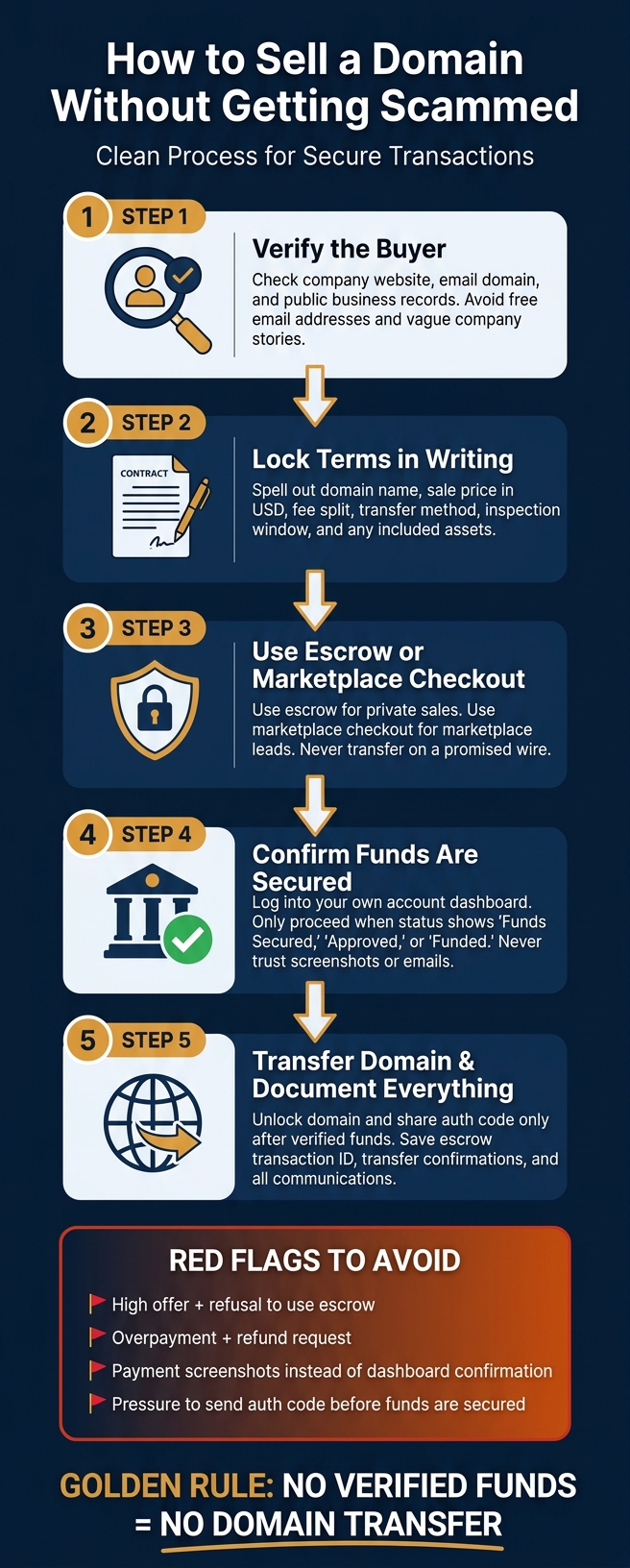
How to Sell a Domain Safely: 5-Step Scam-Proof Process
How to Sell a Domain safely online - a simple Step-by-Step guide
Quick comparison
| Item | Safer Choice | Riskier Choice | Why |
|---|---|---|---|
| Payment | Wire via escrow | Direct PayPal/card | Direct payments can be disputed or reversed |
| Sale flow | Marketplace checkout or escrow | Off-platform deal with no third party | Third-party control lowers fraud risk |
| Proof of payment | Dashboard status in your account | Screenshot or forwarded email | Images and emails can be faked |
| Transfer timing | After funds are secured | Before funds clear | Early transfer can cost you the name and the money |
| Buyer contact | Verified business details | Free email + vague company story | Weak identity details are a common red flag |
Bottom line: I treat domain sales like any high-dollar transfer: no verified funds, no domain move. That simple rule covers negotiation, payment, transfer, and the post-sale handoff.
Step 1: Set deal terms before money or transfer requests move
Put the deal terms in writing before any escrow or transfer request begins. The point is simple: no transfer request until the deal is documented and the buyer has been checked.
Confirm the company behind the inquiry
Check the buyer's company website, email domain, and public business records. Free email addresses and vague mentions of a "finance team" should put you on alert.
If anything seems off, verify the company through public records and the company's own website. Don't rely on contact details from the buyer's first message. Find them on your own.
If the buyer checks out, get the terms written down before any money moves.
Put the terms in writing before opening escrow
Once you've confirmed the buyer is legitimate, write down every deal term before a single dollar moves. Spell out the domain name, sale price in U.S. dollars, fee split, transfer method, inspection window, and any included assets. If the transfer will happen through an internal push or a registrar transfer with an auth code, say that plainly. And if anything comes with the domain, list it item by item.
With the terms set, escrow becomes the next layer of protection.
When to keep the deal inside a marketplace flow
If the buyer found the domain through a marketplace listing, keep the deal inside that platform's built-in checkout and transfer flow. That built-in escrow process holds funds and handles the transfer, including cases like 60-day registration locks or TLD-specific transfer rules. Stepping outside that secure flow just to save on fees can open the door to risk.
If you worked out the deal outside a marketplace, you can still move the buyer into a secure process by creating a custom checkout link or using an external transfer service.
Once the terms are fixed, the next step is to confirm escrow funding before any transfer request.
Step 2: Use escrow correctly and verify funds before transfer
Escrow puts a neutral party between you and the buyer. The buyer sends the money to the escrow provider, the provider checks it and holds it, and only then should you move the domain.
When escrow should be the default
For higher-value private sales, escrow should be your default move. If a buyer tries to rush the transfer or nudges you off-platform, hit pause and bring the deal back to escrow.
A simple rule helps here:
- Use escrow for private sales
- Use marketplace checkout for marketplace leads
- Use direct payment only for trusted repeat buyers
How to verify a real escrow transaction
Fake escrow links often show up in email or direct messages. Don’t trust the link in the message. Type the escrow URL yourself or use a bookmark you already know is correct. Then log in and check the exact domain, sale price, and status inside your own account.
Don’t rely on screenshots or email claims. Those can be faked fast. A real transaction appears in your account dashboard after you sign in, with an official support contact and matching deal details.
What 'funded' means before you unlock the domain
Before you unlock the domain, the only status that matters is whether the money is actually being held by the escrow provider. In plain English, “funds secured” means the money is there.
"Your protection as Seller in using our escrow services is that we will notify you to start the domain transfer ONLY once funds are approved and secured with us, that is, after the Buyer completes payment/account verification." - Escrow.com Support
Do not share your EPP/auth code. Do not unlock the domain until your dashboard clearly shows "Funds Secured", "Approved", or "Funded." And check that status in your own account, not in an email, screenshot, or chat message.
Once funds are secured, the next risk shifts to the payment method and the order of the transfer.
Step 3: Pick safe payment methods and transfer in the right order
Once the price is set and the buyer’s money is locked in, the next thing that matters is how the payment moves and when you start the registrar transfer.
Which payment methods are safest for domain sellers
Pick a payment method that keeps the buyer’s funds from being pulled back while the transfer is still in motion.
Wire transfers through escrow are the safest choice because, once the funds clear, they’re generally non-reversible. Card and PayPal payments can also work well, but only when an escrow service or marketplace holds the money in a neutral account until the ownership change is confirmed.
The risky options are direct PayPal payments and direct card payments. Those come with the highest chargeback risk. A buyer can file a dispute and try to pull the money back after you’ve already handed over the domain.
"Scammers may offer you an unreasonable amount of cash for your domain, but insist that none of it goes through escrow. That way, they can take the money and run." - John Hughes, WPShout
Put simply: the safest payment is the one that stays under escrow control until the domain is in the buyer’s hands.
| Payment Method | Reversibility | Seller Protection | Typical Use Case | Risk Level |
|---|---|---|---|---|
| Wire Transfer (via Escrow) | Very Low | High | High-value domains; professional sales | Lowest |
| Card (via Escrow/Marketplace) | Moderate (Managed) | High | Mid-range sales; quick transactions | Low |
| PayPal (via Escrow/Marketplace) | Moderate (Managed) | High | Small to mid-range sales | Low |
| Direct PayPal or Direct Credit Card | High | Low | Not recommended for domain sales | High |
Transfer steps at the registrar
Don’t unlock the domain until the escrow dashboard shows “funded” or “secured.” That status is your green light.
Before you touch the domain, check three things:
- Make sure the domain isn’t blocked by ICANN’s 60-day rule. If it is, a transfer to another registrar won’t go through. Some marketplace systems can spot this and switch the deal to an internal push instead.
- Check that your registrant email is up to date. Transfer approval emails go to the registrant address on file, and an old inbox can slow everything down.
- Unlock the domain and generate the auth code (EPP code) in your registrar dashboard. Enter that code only into the secure escrow or marketplace portal, not in an email to the buyer.
Some TLDs play by different rules. For example, .co.uk domains use IPS tags instead of auth codes, so check the right transfer method for your extension before you begin.
Save the transfer confirmation before payout is released.
What to document before payout is released
Good records can save you a major headache later if there’s a payment review, a dispute, or a tax question. Before you approve the final release of funds, keep copies of:
- The agreed sale terms or purchase agreement
- The escrow transaction ID and a screenshot showing the “funded” status
- The auth code generation timestamp from your registrar
- Transfer confirmation emails from both the losing and gaining registrar
- All sale-related platform messages
Download or screenshot these records yourself. Don’t assume the platform will keep them forever.
Next, check the red flags that can point to a fake buyer, a fake escrow link, or a rushed transfer request.
Step 4: Red flags, scam patterns, and a seller checklist
Red flags during negotiation and payment
Even after you’ve checked the buyer and agreed on terms, a deal can still go sideways at the payment stage.
The biggest warning sign is simple: the buyer refuses to use escrow. If someone pushes back on a neutral third-party escrow service or a marketplace checkout link, stop and double-check the deal before you move forward.
A few scam patterns show up again and again:
- High offer + no escrow
- Overpayment + refund request
- Screenshots or forwarded payment emails
"A screenshot is not proof that you were paid. Open your real payment app, bank app, PayPal activity, or marketplace payment screen yourself." - Jacob Dymond, ScamClarity
Fake escrow pages are another common trap. They often look almost identical to the real brand, but the URL is slightly off, sometimes by just one character. If the payment or escrow link looks strange in any way, treat it as fraud.
Red flags during transfer and post-sale handoff
Once funding is confirmed, the risk usually shifts from payment tricks to rushed transfer demands and phishing.
If a buyer pressures you to send the auth code right away or wants you to act before funds are secure, that’s a red flag. And if anyone asks for your registrar login, that’s not a buyer mistake. It’s a scam.
Phishing emails can also show up after the transfer starts. These messages may claim the transfer failed and urge you to log in through a link. Don’t click it. Go straight to your registrar’s site on your own and sign in there.
"If a buyer pushes you to communicate outside the secure flow, that's a red flag. Legitimate buyers understand why security matters in high-value transactions." - Cory Hogan, Co-Founder and CEO, Unbroker
Conclusion: A five-point checklist for every domain sale
Before you unlock the domain, run the same five checks every time. It takes a few minutes, and it can save you from a very expensive mistake.
| Step | What to Do |
|---|---|
| 1. Verify the buyer | Verify the buyer independently |
| 2. Lock terms in writing | Lock terms in writing before payment |
| 3. Use escrow or an approved marketplace flow | Never transfer on a promised wire |
| 4. Transfer only after verified funds | Confirm funds in your own account before transfer |
| 5. Document everything | Keep auth code records, transfer confirmations, and all communications until payout clears |
Scams work because they often look routine. This checklist takes the guesswork out of the process. Verify the buyer, lock the terms, use escrow, confirm the funds, and document the sale every single time.
FAQs
What if the buyer refuses escrow?
If a buyer refuses escrow, you should usually walk away.
That’s a big red flag. A neutral third party helps protect both sides, so when someone pushes for direct payment instead, there’s often a reason - and it’s usually not a good one. Scammers do this all the time to get around basic safeguards.
If the buyer wants a different setup, push for a trusted marketplace like Dan.com, Afternic, or Sedo to handle both payment and transfer.
For high-value domains, direct payment is risky. You could face a chargeback, or worse, lose the domain before the money is fully and safely confirmed.
Can a domain sale be reversed after transfer?
Generally, no. Once the domain transfer is complete and ownership officially changes hands through a secure, neutral escrow platform, the sale is usually final and can't be reversed.
A professional escrow service helps protect both sides by holding the funds until the domain is confirmed in the buyer's control. If the deal happens outside a verified, monitored platform, there may be little or no way to fix things if a dispute comes up.
How do I spot a fake escrow link?
Never use a payment or escrow site picked by the other party. That's a big red flag, especially if they push you to use one service you haven't checked for yourself.
Another warning sign: the site asks for your full credit card details instead of sending you through a normal checkout flow. That often points to fraud.
Go to the official escrow or marketplace site on your own, and stop the transaction if anything feels off.