
If you still handle domain leads from a shared inbox, you’re likely losing replies, time, and sales. This guide shows me a simple fix: send every inquiry into one of four paths - instant reply, needs-info, negotiation, or high-priority follow-up - based on clean form data, buyer score, domain tier, and offer level.
Here’s the whole idea in plain English:
- I collect the same core fields for every inquiry: buyer info, domain, source, budget, timeline, and use case
- I clean the data first so routing rules don’t break
- I score leads with budget, authority, need, and timeline
- I send incomplete inquiries to a needs-info path instead of guessing
- I route by domain tier, offer ratio, and buyer profile
- I track response time, conversion, sale price, and ask-to-close gap
- I use overnight automation and a morning summary to review what happened after hours
A few numbers stand out. The average business takes 47 hours to reply to a lead, while replying within 5 minutes makes contact 100x more likely than waiting 30 minutes. The article also points to 25%: 30% conversion lift from AI-guided routing versus manual assignment or basic rule handling.
My takeaway: this is not about fancy workflow design. It’s about using clean input, simple rules, and daily review so each buyer goes to the right next step without inbox chaos.
| Area | What matters most |
|---|---|
| Intake | Structured fields from landers, email, and marketplaces |
| Qualification | BANT-style scoring with set thresholds |
| Routing | Premium vs. standard domains, plus offer size and buyer type |
| Follow-up | Auto-replies for missing info and priority handling for top leads |
| Review | KPIs, nightly checks at 2:00 AM, and a morning activity feed |
If I were setting this up, I’d start small, keep the rules simple, and change the model only after 30: 60 days of clean lead history.
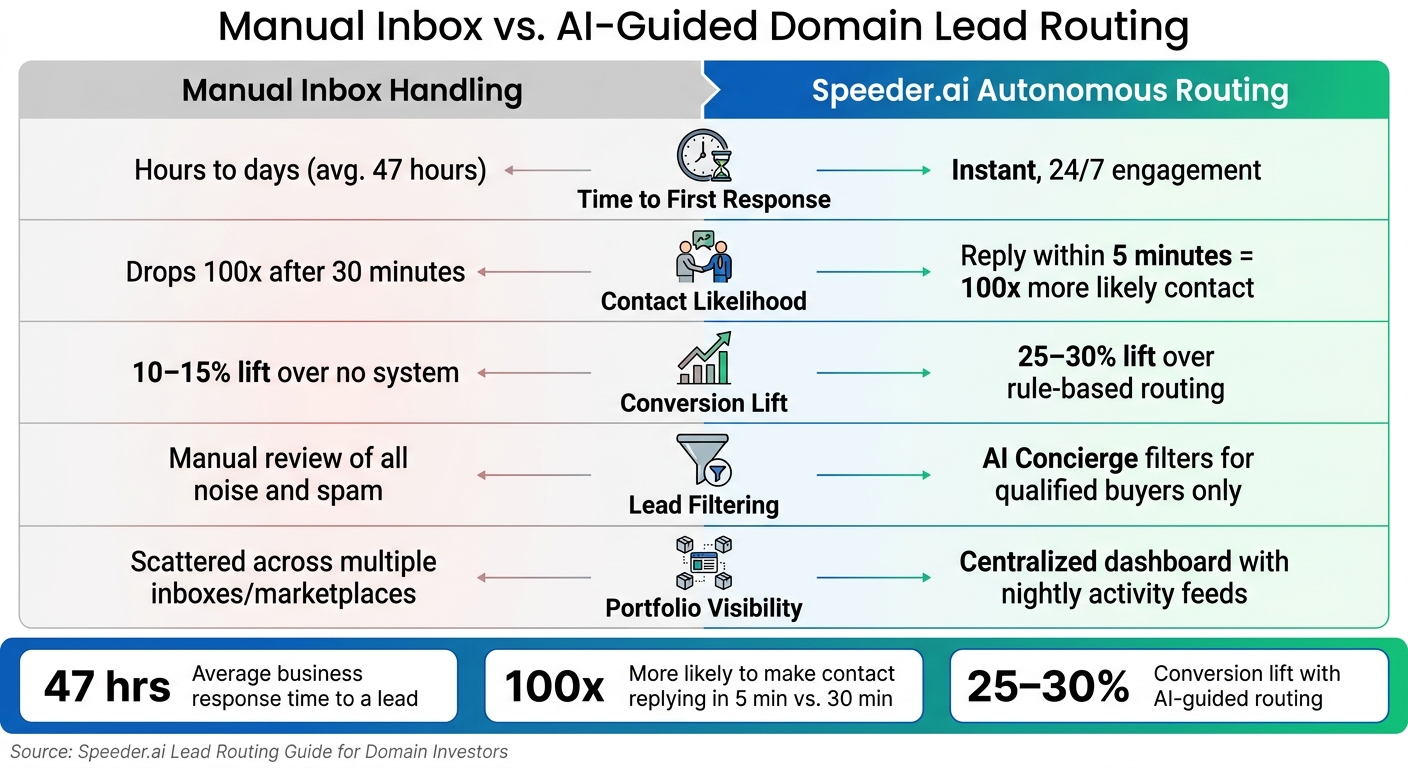
Manual Inbox vs. AI-Guided Domain Lead Routing: Key Metrics Compared
How to Build Unstoppable Lead Routing Workflows with Zapier & HubSpot
sbb-itb-96552b7
1. Capture buyer inquiries with a clean data model
Your routing logic is only as good as the data behind it. Before you set up even one rule in Speeder.ai, each inbound inquiry should come in through a consistent, structured format. In plain English: you need to know where the lead came from and which fields that source can give you with some level of consistency. From there, you can capture the data in a format the router can actually work with.
Inbound sources: landers, email, and marketplace messages
Domain investors usually get inquiries from three places: for-sale landing pages (landers), direct inbound email, and marketplace contact forms. Each one works a little differently.
Speeder.ai can generate landing pages for portfolio domains and add a structured "Make an Offer" form. Speeder.ai landers give you the cleanest intake. Email and marketplace messages, on the other hand, usually need to be cleaned up and standardized first.
Required fields for routing and scoring
Every inquiry that enters Speeder.ai's routing system should include a core set of fields:
- Identity: buyer name, email, company, phone
- Domain details: requested domain, portfolio tag (for example, "AI-Brandable" or "Geo-Service")
- Deal terms: intent type (buy vs. lease), budget range, timeline, use case
- Source: Lander, Direct Email, or Marketplace
Each field should help the system make a routing decision. Source can point to priority. Budget can hint at urgency. Use case can show fit.
The portfolio tag and use case field work together to drive tier-based routing and lead scoring. The tag tells Speeder.ai which rule set should apply. The use case helps show whether the buyer is a match. A corporate email plus a specific use case can be a strong sign that the lead deserves attention sooner.
It also helps to store multiple domain interests under one buyer record. If someone asks about three names in your portfolio, that says something very different from a buyer asking about just one.
Standardize values before you automate
Raw inquiry data gets messy fast. Normalize offer amounts into numeric USD, dates into MM/DD/YYYY, phone numbers into U.S. format, and domains into bare domain names.
Structured forms move through routing the fastest. Email usually needs the most cleanup. Marketplace messages tend to land somewhere in the middle.
Once intake data is normalized, you can score each inquiry the same way every time.
2. Qualify buyers before assigning them to a workflow
Once your intake data is normalized, the next step is simple: decide whether this buyer is worth your time right now. That call should come from a system, not instinct.
Score Budget, Authority, Need, and Timeline
Use BANT - budget, authority, need, timeline - to score domain inquiries. Those signals are already in your intake fields. A corporate email can point to authority. Launch timing or an existing .net can point to need and urgency. Use that score to choose the next workflow, not to start negotiating yet.
Turn qualitative signals into fields and thresholds
The job here is to turn those signals into a score that routes the lead on its own. Each BANT factor maps to a field you already collect, and each field should have a threshold that decides where the buyer goes.
| Qualification Factor | Field Used | Premium Workflow | Standard Workflow | Deprioritized |
|---|---|---|---|---|
| Budget | offer_amount / budget_range |
>$10,000 or venture-backed | $2,000: $10,000 | <$2,000 or "make offer" |
| Authority | sender_email / buyer_type |
Corporate domain or VC-backed startup | Startup or agency | Gmail, anonymous, known domainer |
| Need | use_case / intent_signal |
Rebrand, product launch, or owns the same keyword in a weaker extension | Defensive registration, general interest | Vague or no context |
| Timeline | urgency_signal |
"Launching soon", "ASAP", or 2+ follow-ups | "Exploring options" | No timeline given |
| Identity | enrichment_status |
LinkedIn/Crunchbase verified | Partial match | Free email, no company |
One practical setup is to set a floor, like routing only leads with a score of 80+ into your premium workflow. Low offers and templated messages should move down the queue.
Handle missing data with a needs-info path
Not every inquiry comes in complete. If budget, company name, or use case is missing, don’t shove the lead into the wrong workflow too early. Send an automated clarification reply instead, and place the inquiry in a dedicated needs-info bucket.
Use Concierge to send that clarification reply and move incomplete leads into needs-info. Scout and Research can fill in missing fields overnight.
With the lead scored, route it by domain tier and buyer profile.
3. Build routing rules in Speeder.ai for different buyer and domain types
Route by domain tier, offer ratio, and buyer profile
Once you score a lead, send it into the right workflow automatically. A simple setup works best: split inventory into two groups. Put top-tier .com and .ai domains in Premium. Put everything else in Standard.
From there, route by offer threshold:
- 70%+: send to priority negotiation
- 30%: 70%: send to standard negotiation
- Under 30%: send to auto-counter or soft-decline
Buyer type matters too. If a buyer looks like a company based on funding, hiring, or brand activity, route them differently from an individual buyer, even when the offer amount is the same. The logic is simple: the same number can mean very different things depending on who is behind it.
Assign agent actions and ownership rules
Set clear roles so the system doesn’t feel messy.
Use Concierge to screen replies and hand qualified buyers to the owner for closing. Use Support for triage and templated first replies. Use CEO to bring priority decisions into the morning activity feed.
Two ownership rules do most of the heavy lifting. First, assign each domain to a specific internal owner. That way, replies come from a real person instead of a generic account. Second, merge repeat inquiries from the same buyer or company into one record, then route that record to a priority agent.
That alone cuts down on confusion. It also keeps your team from treating the same buyer like three different people.
Pick a routing model you can actually maintain
After ownership rules are set, pick the simplest routing model your data can support. If the setup is too fancy for the data you have, it usually falls apart.
| Routing Strategy | Response Speed | Revenue Potential | Operational Complexity |
|---|---|---|---|
| Single Global Queue | Fast | Moderate | Low - best for small portfolios |
| Tier-Based Routing | Very Fast | High | Moderate - focuses on high-value assets |
| Buyer-Profile Routing | Moderate | Very High | High - requires detailed buyer data |
Start with a single global queue if you want the fewest exceptions and the easiest maintenance. Move to tier-based routing when you have a clean premium/standard split and reliable offer data. Move to buyer-profile routing after 30: 60 days of clean disposition data.
Next, track response time, conversion, and negotiation quality so the rules keep getting better.
4. Monitor performance and tighten the system over time
Once routing is live, you need to check if the rules are doing their job: better replies, better sales, and less wasted time.
Track response time, conversion, and negotiation quality
Watch six KPIs:
- time to first response
- lead-to-offer rate
- qualified-buyer rate
- negotiation-to-sale conversion
- average sale price (ASP)
- ask-to-close gap
These numbers show whether your fields and thresholds are sorting leads the right way. If response time gets slower, qualified-buyer rate falls, or the ask-to-close gap gets bigger, the rules likely need work. The daily activity feed helps you spot what happened in plain English: which leads were routed well, which were escalated, and which rules need tuning.
Use nightly automation and the daily activity feed
At 2:00 AM, the CEO agent reviews the portfolio, ranks tasks, and coordinates Support, Research, and QA overnight. By morning, the daily activity feed and email summary show what shipped overnight, including leads generated, replies sent, and urgent issues escalated.
That overnight review is more than a status update. It helps you find weak spots in the routing logic. When Support escalates a lead, it often points to a problem with a field, a threshold, or a needs-info path that isn't working as planned. If one domain tier starts showing lower close rates, the overnight cycle can shift routing priorities before the next run.
Use the feed and KPI trendlines together to judge whether the system is working.
Conclusion: The minimum viable routing system for a domain portfolio
The setup comes down to four steps: capture structured inquiry data, qualify buyers with clear fields and thresholds, route by domain tier and buyer intent, and measure outcomes on a regular basis. Companies using AI-guided routing report conversion lifts of up to 30% versus manual assignment. Speeder.ai's investor plan runs at $1 per domain per month with 0% commission on sales.
Manual inbox handling vs. autonomous routing:
| Metric | Manual Inbox Handling | Speeder.ai Autonomous Routing |
|---|---|---|
| Time to First Response | Hours to days, especially on weekends | Instant, 24/7 engagement |
| Conversion Lift | 10: 15% lift over manual | 25: 30% lift over rule-based |
| Lead Filtering | Manual review of all inquiry noise and spam | AI Concierge filters for qualified buyers only |
| Portfolio Visibility | Scattered across multiple inboxes/marketplaces | Centralized dashboard with nightly activity feeds |
After 30 days of disposition history, shift more weight to buyer-profile routing and dynamic re-scoring.
FAQs
How should I score domain leads?
Score domain leads by keeping qualification separate from ownership. The idea is simple: use fixed math to assign a 0: 100 quality score based on enrichment data, such as industry fit, company size, and tech stack.
Then look at the inquiry itself for intent. For example, does it mention a specific project or a clear use case? That kind of detail can tell you a lot.
In Speeder.ai, this setup helps teams focus on leads with strong fit and clear intent, while automated filters take care of routine inquiries.
What happens when a buyer inquiry is incomplete?
If a buyer inquiry comes in incomplete, the AI looks at the details it does have and the intent behind the message to fill in the gaps.
That means the platform can keep the lead moving and send it to the right place, even when the form submission is messy or only half-finished. No manual inbox triage needed.
When should I switch to buyer-profile routing?
Switch to buyer-profile routing once your domain portfolio gets large enough to attract different kinds of buyers with different specialties, like industry focus, geography, or price range.
At that stage, it makes sense to send inbound leads to the buyer most likely to close that deal, instead of pushing every lead through the same generic path.